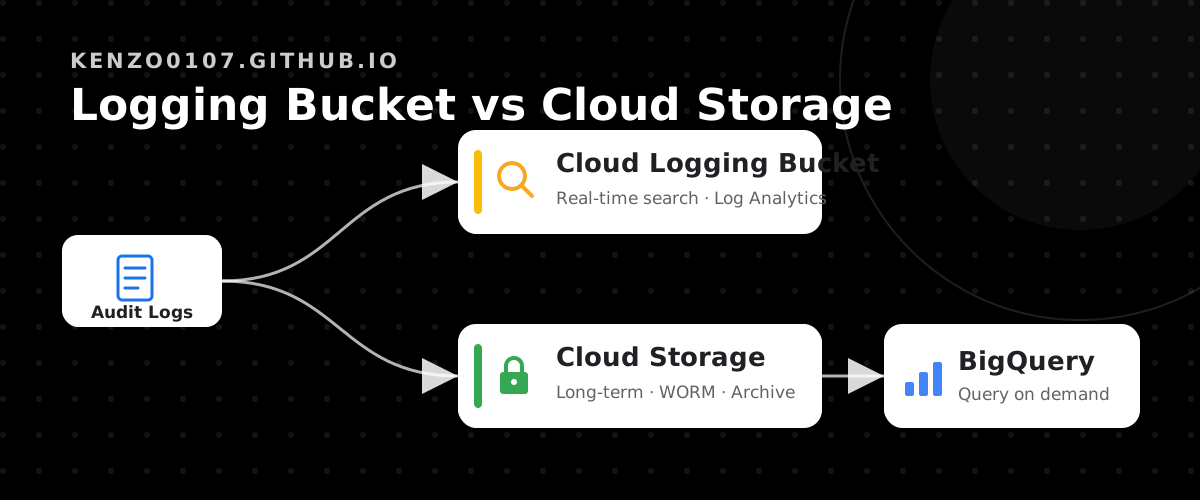
Choosing Between Cloud Logging Buckets and Cloud Storage for Audit Logs
While designing a setup to aggregate and retain audit logs long-term on Google Cloud, I had to decide where to store them: a Cloud Logging bucket or Cloud Storage (GCS).
The names are similar and both can hold logs, so they are easy to confuse — but the two are clearly suited to different jobs.
This post organizes the differences from the angle of “which to choose based on your use case.”
What Are We Actually Trying to Solve?
Log aggregation usually breaks down into these two goals:
- Cross-cutting search: search logs scattered across many projects/accounts all at once
- Long-term, tamper-resistant retention: retain logs in a tamper-resistant form for incident tracking and audit response (equivalent to AWS CloudTrail aggregation + S3 Object Lock)
Recent logs can still be traced in each project’s Logs Explorer (_Required is 400 days, _Default defaults to 30 days).
So the essential value of aggregation lies in “cross-cutting reach” and “long-term retention.”
And against these two goals, Cloud Logging buckets and Cloud Storage split cleanly into strengths and weaknesses.
Cloud Logging Bucket vs. Cloud Storage
| Aspect | Cloud Logging bucket | Cloud Storage bucket |
|---|---|---|
| Cross-cutting / real-time investigation | ◎ Instant via Logs Explorer / Log Analytics (SQL) | △ JSON files accumulate. Batch investigation via BigQuery |
| Max retention | 3650 days (10 years) cap. No perpetual retention | ◎ Unlimited (perpetual possible) |
| Storage tiers | ✕ None. Flat ~$0.01/GiB/month | ◎ Standard to Archive + Autoclass |
| Tamper resistance | △ Bucket lock prevents deletion / shortening | ◎ Bucket Lock = true WORM (equivalent to S3 Object Lock) |
| Ingestion charge | $0.50/GiB (re-charged at the aggregation destination) | Routing is free. GCS storage cost only |
Boiling it down to the key points:
Ease of Search and Investigation
The biggest strength of a Cloud Logging bucket is that you can investigate immediately, right there, with Logs Explorer and Log Analytics (SQL).
You can trace “who did what, when” in real time and across projects.
In contrast, logs routed to Cloud Storage simply accumulate as date-partitioned JSON files.
Logs Explorer cannot be used, so to investigate you query them via something like a BigQuery external table. Investigation is possible, but it is near-real-time and takes an extra step.
A natural question is “can’t you investigate while it stays in GCS?” The accurate answer is: investigation itself is possible, but it takes more effort.
Retention Period and Tamper Resistance
For long-term retention and tamper resistance, Cloud Storage has the overwhelming advantage.
- Retention: Logging buckets are capped at 10 years and cannot retain data forever. GCS is unlimited, and if you place no deletion lifecycle rule, retention becomes perpetual.
- Tamper resistance: GCS Bucket Lock is true WORM (Write Once Read Many). Once you lock the retention policy, not even an administrator can delete or shorten it. This is equivalent to AWS S3 Object Lock (COMPLIANCE mode).
Storage Tiers and Cost
GCS has tiers from Standard to Archive, so you can automatically move older logs to cheaper tiers.
The Archive tier unit price is about 1/10 of Standard, making it a great fit for data like audit logs that you “store but rarely read.”
On top of that, GCS Archive offers instant retrieval (no restore wait, unlike AWS Glacier Deep Archive), so when an audit is needed you can reference it right away.
Logging buckets have no tiers and bill at a flat rate. Also note that the aggregation destination re-incurs an ingestion charge ($0.50/GiB).
So Which Should You Choose?
Organized by use case, the decision is simple.
| What you want to do | Recommendation |
|---|---|
| Search/investigate across projects in real time | Cloud Logging bucket (Log Analytics) |
| Retain 5+ years to perpetual, tamper-resistant, in a cheap tier | Cloud Storage + BigQuery external table |
| Do both | GCS as the core, with a Logging bucket alongside |
For the primary goal of long-term audit log retention, Cloud Storage + a BigQuery external table is the front-runner.
This mirrors the AWS “S3 + Athena” pattern almost exactly:
- 5-year WORM (Bucket Lock)
- Perpetual retention (place no deletion lifecycle rule)
- Tier transition (move to Archive after 30 days)
- Query with BigQuery when needed
This also aligns neatly with an AWS CloudTrail aggregation setup.
Only when you also want real-time cross-cutting search should you consider adding a Cloud Logging bucket alongside, so you can investigate instantly with Log Analytics.
Where Cost Bites
In this setup, the nearly sole variable cost is BigQuery queries.
Searching the Archive tier via an external table incurs scan charges plus retrieval charges.
- If your auditing is mostly low-frequency, GCS + BigQuery is plenty cheap (storage cost barely grows even as you add target services, because Archive is dirt cheap)
- If you want to search across logs frequently, a Logging bucket (Log Analytics) is cheaper and faster because it has no retrieval charge
In short: “storage is dead cheap, but if you search frequently, adding a Logging bucket pays off.”
Summary
- Cloud Logging buckets and Cloud Storage have similar names but are suited to different jobs
- Instant, cross-cutting investigation → Cloud Logging bucket (Log Analytics)
- Long-term, tamper-resistant, cheap retention → Cloud Storage (Bucket Lock + Archive) + BigQuery
- If aggregating and retaining audit logs long-term is the primary goal, GCS + BigQuery is the front-runner; add a Logging bucket if you need real-time search
- The only real variable cost is BigQuery queries; storage cost is negligible thanks to the Archive tier
I hope this helps as a decision aid when you’re unsure which one to use.
References
