passwd kibana Changing password for user kibana. New password: [enter password] BAD PASSWORD: it is based on a dictionary word Retype new password: [enter password again] passwd: all authentication tokens updated successfully.
// Configure as follows elasticsearch: "http://(domain)/es/",
Leave the kibana user
1
exit
Configure /es/ as a reverse proxy for connecting to Elasticsearch
1 2 3 4
htdigest -c /etc/httpd/conf/htdigest "Required authentication" (the ID you want to set for Basic authentication) Adding password for okochang in realm Required authentication. New password: [enter password] (the password you want to set for Basic authentication) Re-type new password: [enter password] (the password you want to set for Basic authentication)
vim /etc/httpd/conf.d/vhosts.conf
Syntax-check the configuration file
1
httpd -t
▼ Result
1
Syntax OK
Restart httpd
1
service httpd restart
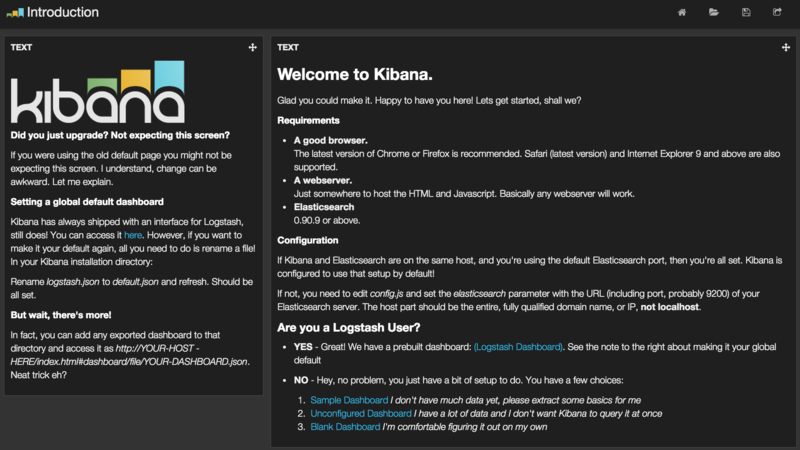
kibana admin screen
1
http://(domain)/#/dashboard/file/default.json
If it displays as shown below, you have succeeded.
<match log.**> # Use fluentd-plugin-elasticsearch type elasticsearch
# Format the index for use with Kibana logstash_format true
# Specify the index prefix logstash_prefix demo-log
# Destination Elasticsearch hosts localhost:9200
# Specify the document type when writing to Elasticsearch type_name application-log
# buffer settings - use a memory buffer buffer_type memory
# Chunk size 1MB buffer_chunk_limit 1m
# Maximum chunk queue size 128 buffer_queue_limit 128
# Flush the buffer every specified number of seconds - issues a write request to Elasticsearch every specified number of seconds flush_interval 2s
# Maximum number of retries when a flush fails retry_limit 17 </match>
1
2
3
4
5
6
7
8
// Create the tmp directory
mkdir /var/log/td-agent/tmp
// Fix the owner
chown td-agent.td-agent /var/log/td-agent/tmp
// Configure startup at server boot
chkconfig td-agent on
// Start
service td-agent start