Formatting Specific CSV Columns with awk — Treating Numbers as Strings
Overview
When you want to extract some customer data and report on it,
if a CSV file contains a mobile phone number such as “090”, opening the CSV file in Excel
may turn it into “90”.
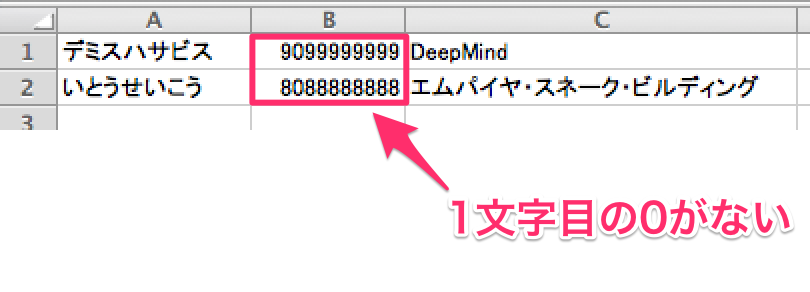
For such cases, here is a summary of how to treat the values in a specific column as strings.
How to treat numbers as strings in Excel
Given
1 | "090" |
formatting it like
1 | ="090" |
makes it be treated as a string.
Example)
1 | "デミスハサビス",="09099999999","DeepMind" |
Let’s format it
- Example) Suppose you have a tmp.csv like the following.
1 | "デミスハサビス","09099999999","DeepMind" |
- Add
=to the left side of only the second column.
※ Add an “=” to the left side of the value enclosed in “ (double quotes).
※ For clarity, I deliberately specified the fields $1, $2, $3 explicitly.
1 | $ awk -F ',' '{print $1 ",="$2","$3}' tmp.csv |
As shown above, “=” has been added.
- Specify the output destination
1 | $ awk -F ',' '{print $1 ",="$2","$3}' tmp.csv > output.csv |
Let’s open output.csv in Excel.
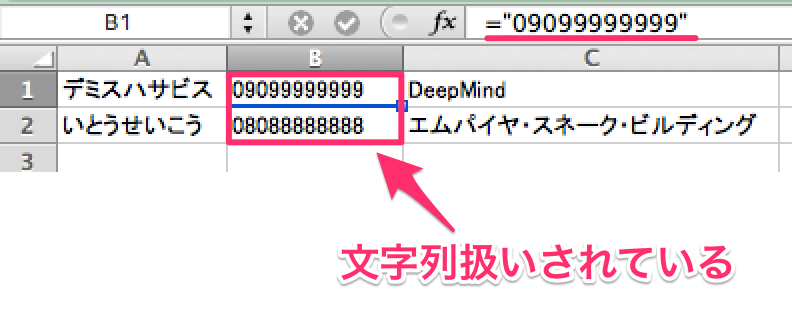
Done ♪
Bonus
When opening with Excel, the default encoding on Windows is SJIS, so if the character encoding is UTF8, the text will be garbled.
Below, we convert the character encoding of the CSV file to SJIS.
1 | $ nkf -sLw output.csv > output_sjis.csv |
That’s all.
