I built a soccer tactics board that runs in the browser — to explain tactics to my kid
I built a soccer tactics board where you place players, save their movements one step at a time, and play it back as a smooth animation. It’s a build-free HTML + pure JavaScript app that you can drop straight onto GitHub Pages.
Repository: kenzo0107/soccer-tactics-board
Why I built it — a physical board couldn’t explain it
It started when I bought this book to explain soccer “formations” and “numerical superiority” to my kid.
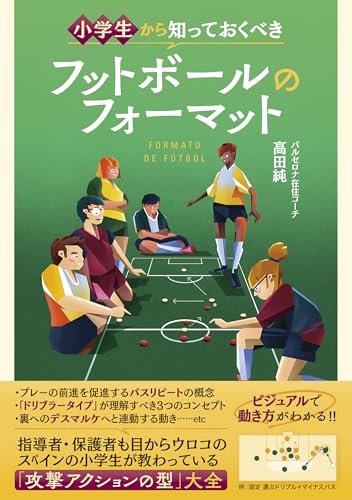
The content is great, but when I tried to reproduce plays on a board, I found a physical (magnet-style) tactics board hard to use for the following reasons:
- You can’t move multiple players “simultaneously.” Even shifting magnets one at a time, you can’t convey the “timing” of a phase where the passer, receiver, ball, and opposing defender all move at once.
- You can’t repeat the same movement over and over. Once you break the shape, resetting to the initial positions is a hassle, so it’s hard to answer “show me one more time.”
- No trace of the movement is left. With a still image you can’t fully follow which player ran where.
So I figured it would be nice to have a tool where, if you save the positions step by step, a single play button moves everyone simultaneously, as many times as you want — and that’s the tactics board I built. It works with touch on a phone too, so I can show it to my kid right then and there.
What kind of app is it
On a portrait-oriented field, you can freely place red-team and blue-team players, the ball, markers, and speech bubbles (commentary text).
Here’s what it looks like when you actually play back a “2v1 (breaking through with numerical superiority)” tactic. The banner on the field is the current step, and the dotted arrows are the movement traces from the previous step.

Unlike a still magnet board, all players and the ball move simultaneously, and the dotted lines leave behind who ran where. Playback loops, so there’s no need for “one more time.”
How to use it
0. Try out how it moves with presets

Click the hamburger button in the top-right corner to access the pre-configured animation patterns like 2vs1, then select one. The player and ball will be positioned, and clicking the play button will activate the animation.
1. Place players and the ball
Place them from the vertical toolbar on the right of the screen.
| Button | Role |
|---|---|
| 🔴 +Red player | Add a red-team player |
| 🔵 +Blue player | Add a blue-team player |
| ⚽ +Ball | Add a ball |
| 🔘 +Marker | Add a cone / marker |
| 💬 +Speech bubble | Add a speech bubble with commentary text |
| 🗑 Delete | Delete the selected object |
You can move placed objects freely by dragging with the mouse (or touch on a phone). Tap a player to also edit their facing direction (triangle marker), jersey number, and name.
2. Save movements as steps
This is the heart of the app. With the + (save step) on the controller at the bottom, you record the entire arrangement at that instant as one frame.
- Set the initial arrangement and save with + (STEP 1)
- Move players and the ball, then + again (STEP 2)
- Repeat this to build up the phase
| Button | Role |
|---|---|
| + | Save the current arrangement as a new step |
| ✓ | Overwrite the displayed step with the current arrangement |
| − | Delete the displayed step |
| ◀ / ▶ | Go to the previous / next step |
| Slider | Jump to any step |
3. Play it back
Press ▶ Play and it auto-plays, interpolating between the saved steps. Rather than teleporting from frame to frame, it accelerates and decelerates with easeInOutQuad, so it looks closer to how real players start and stop.
Even as players increase, like in a 3v2, everyone moves at once.

If you place speech bubbles on each step, you can leave the coaching intent alongside it too — “draw the defender in here,” “pass into the open space.” Here’s what it looks like when you play back a training drill (a 9-step 2v1 training session).

- Save to the browser: it auto-saves to LocalStorage and is restored even after a reload
- JSON export / import: export and import a tactic as a
.jsonfile. You can share it with family or teammates. - GIF export: export the tactic animation as a GIF (the GIFs in this article were generated from data in this same format)
- Presets: load standard patterns prepared in advance, like 2v1 and 3v2, from the menu
Technical notes
- Draws the field and players with the HTML5 Canvas API
- Pure JavaScript (ES Modules) only. No frameworks or build tools.
- Animation is implemented as “linear interpolation between steps + easing” (
requestAnimationFrame) - Persistence via LocalStorage, with JSON for import/export
- Responsive, so it’s operable on PC, phone, or tablet
Since it’s entirely self-contained with static files, you can put it straight onto GitHub Pages or any static hosting.
Did it actually get through to my kid?
When I walked through the moves on this page, saying “this is how you should move,” and repeated it a few times, my kid started saying “Oh, I get it!”
Before long they were poking at it on their own phone too, and using it to talk tactics with friends — “How about this play?” That felt like a great turn of events.
Closing
I built it because I wanted to solve the things a physical board makes hard: “moving everyone simultaneously,” “repeating as many times as you want,” and “leaving a trace of the movement.” Beyond explaining things to my kid, it turned out to be useful for sharing tactics within a team and recording training drills too.
The source is public, so please give it a try if you like.
- Repository: kenzo0107/soccer-tactics-board
